What to Expect During a Demo With RightCapital
December 9, 2025
 "Screenshot of Asset Allocation within RightCapital and text \"What to Expect During a Demo with RightCapital\"")
Key Takeaways
- A RightCapital demo is personalized and hands-on. Specialists tailor the session to your practice, walking through how RightCapital fits into your client workflow, tech stack, and planning style.
- You'll see major planning modules in action such as retirement, tax, investment, risk, education, estate, insurance, and the business planning module. Live "what-if" scenarios show how plans recalculate instantly when variables change.
- RightCapital's 40+ integrations are explored alongside OCR-powered plan migration from eMoney and MoneyGuide, so you leave with a clear picture of how to switch without losing existing client data.
Ready to explore the highest-rated financial planning software on the market? Schedule a personalized one-on-one virtual demo with our Sales Team at a time that works best for you. In just 20 minutes, we'll show you how RightCapital's intuitive, powerful tools can transform your practice. We’ll tailor every moment to address your unique needs, whether you're managing complex tax situations, serving business owners, or scaling your advisory practice. Come prepared with questions and we'll demonstrate exactly how RightCapital can fit into your workflow.
No prep needed
When you join your demo, one of our Sales Executives will welcome you and guide you through an interactive introduction. This is where we listen. Tell us about the size and goals of your firm, your planning philosophy, your ideal client profile, and the pain points you're experiencing today. Are you struggling with repetitive data entry? Want to deliver more sophisticated retirement projections? Managing business owner clients with complex needs?
After seeing how RightCapital can transform your practice and client relationships, our team can then walk through how to leverage our 40+ integration partners to have direct data feeds to accounts you manage and to make the data entry process even easier. Those coming from the eMoney platform can efficiently transfer existing client plans from eMoney reports into RightCapital using our optical character recognition (OCR) technology.
Financial planning done right
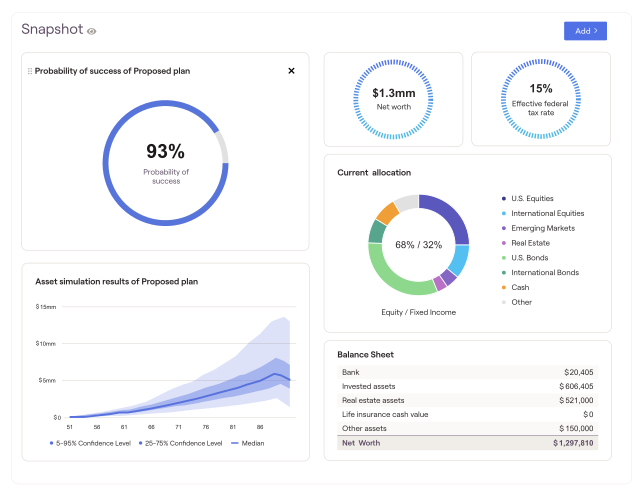
As one of our Sales Executive Managers, Chi Lam, says, “RightCapital is your ecosystem.” During this section, you'll witness the platform's remarkable flexibility firsthand. We'll walk through how easy it is to set up a client profile, from family structure and income streams through expenses, assets, and liabilities, and see how this data immediately feeds into comprehensive financial plans.
This is where RightCapital truly shines. You'll see our signature visualization tools in action:
- Blueprint™ brings household finances to life through interactive, color-coded visuals that show net worth, goals, income, savings, and expenses at a glance, exactly what your clients need to see to understand their complete financial picture
- Snapshot™ lets you create polished, customized plan summaries in seconds, complete with professional charts and your personalized notes, ready to share via the client portal or PDF
- Cash Flow Maps help clients visualize exactly where money flows in and out each year, making abstract financial concepts concrete and actionable
We'll also showcase our mobile app and client portal, demonstrating how you can engage clients between meetings and keep them updated on their financial progress in real time. You’ll also learn how to personalize your software including your own branding and which modules and features should show for each client.
Planning features you won’t want to miss
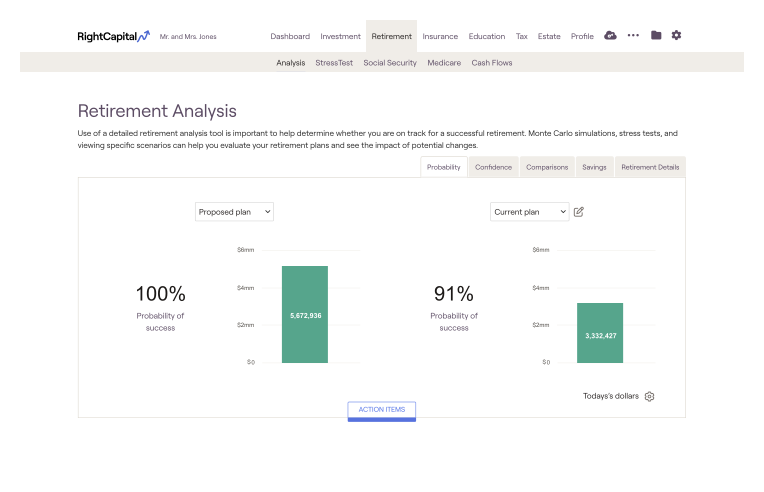
Now for the technical deep dive. You'll explore RightCapital's specialized modules, each designed for a specific planning challenge:
- Retirement Planning: Dynamic retirement spending strategies that model multiple scenarios such as guardrails, floor-and-ceiling strategies, staged spending, and retirement spending smile, going far beyond standard inflation-adjusted models
- Tax Planning: Adaptable strategies including Roth conversion analysis, asset location, and tax-efficient withdrawals
- Social Security Optimization: Pinpointing the optimal filing age for maximum benefits and analysis of the breakeven point between different filing ages that account for standard retirement benefits, spousal benefits, and more
- Retirement Income & Expenditure Analysis: Annuity proposal illustrations, pension option comparisons, and accounting for the dynamics of Medicare premiums in the financial plan
- Investment and Risk Management: RightRisk™ assessment tools and portfolio analytics
- Education Planning: College funding strategy modeling
- Estate Planning: Dynamic trust proposals and visuals of a client’s estate
- Insurance Analysis: Life, disability, property and casualty, and long-term care planning integrated into your complete financial picture
- Business Planning: A new-in-2025 capability that allows you to model client businesses, including assets, liabilities, revenue, expenses, and potential sale strategies, right within the financial plan
This is your chance to ask "what if" questions and watch RightCapital instantly recalculate plans based on changing variables. Is your client interested in retiring three years earlier? Watch the impact ripple through their retirement spending, tax strategy, and portfolio needs in seconds.
You’ll also learn how to interact with our highest-rated-in-industry support team. They are available from 9 am to 6 pm ET via phone, email, scheduled calls, or in-platform chat support.
A 14-day free trial, on us
Once your demo concludes, you'll unlock a complimentary 14-day trial. This is your playground. Experiment with sample client scenarios, explore the modules that matter most to your practice, test integrations, and experience the efficiency gains firsthand. We've created a comprehensive guide to maximize your trial period so you can confidently evaluate whether RightCapital is the right investment for your firm.
Ready to see RightCapital in action? Let's schedule your demo today.
RightCapital demo FAQs
A standard RightCapital demo is a personalized 1:1 session that typically lasts about 20–30 minutes, with Q&A throughout.
A specialist walks you through the advisor portal, shows how to set up a client profile, demonstrates planning modules (retirement, tax, investment, risk, estate, insurance, education, business), and runs live "what-if" scenarios. They'll also cover integrations, migration options, and which subscription tier fits your firm.
Yes. After the demo, you can start a 14-day free trial of RightCapital to explore the platform on your own, build sample plans, and test integrations with your existing tools before committing to a subscription.
Yes. The demo includes a walkthrough of RightCapital's OCR-powered migration tools, which allow you to upload eMoney or MoneyGuide PDF reports and automatically import key client data (family info, goals, income, and more) without manual re-entry.
 "Text of \"How to Make the Most of Your Free RightCapital Trial\"")
 "Q3 2026 update: Personalized planning with Iris™. Graph compares retirement healthcare costs for Winnie and Nate by age group.")
 "Blue background with white text reading, \"AI Tools for Financial Advisors: A Practical Guide for 2026,\" and a small arrow in the corner.")
 "Title of \"Iris AI Planning Agent, Redesigned Advisor Portal, and More: RightCapital's Q2 2026 Updates\"")
 "Title of \"Which RightCapital Subscription Plan Is For You?\"")
 "Title of \"The Top 5 Retirement Planning Questions Clients Ask (+ How to Answer Them)\"")