2025 in Review: RightCapital’s Most Exciting Enhancements
January 2, 2026


Key Takeaways
- The new-in-2025 Business module allows advisors to model business cash flows, track business assets and liabilities, build sale proposals, and evaluate tax strategies.
- RightExpress turns prospect conversations into simplified plans within minutes. Express plans are convertible to full plans with one click.
- OCR-powered plan migration allows advisors to import eMoney reports; no manual re-entry required.
2025 was a big year for RightCapital, packed with enhancements to help advisors deliver more value with less manual work. These updates included turning tax returns into actionable planning conversations, and expanding business owner planning, prospecting, integrations, and reporting flexibility. Financial planning keeps becoming more efficient, more visual, and easier to personalize at scale. Here’s a look back at what you can do with RightCapital’s most exciting enhancements from 2025:
Transform your tax planning offering with Tax Analyzer
Transform your tax planning offering with RightCapital's Tax Analyzer. No need to manually scrub lengthy, complicated tax returns. Now with just a few clicks, advisors can easily identify tax-smart opportunities, creating better outcomes for clients all within their financial planning software.
Securely upload client tax returns into RightCapital. Our advanced Optical Character Recognition, or OCR, technology, will pull in the relevant information for your review without including any sensitive information such as Social Security or account numbers.
The Tax Analyzer uses uploaded returns to help advisors propose plan changes that can maximize tax opportunities easily. Compare how the proposed changes could have impacted the tax burden in the prior year to help plan for the future. Identify how the proposed changes could impact deductions, exemptions, and credits.
The Tax Analyzer delivers: enhanced onboarding with a clear understanding of tax obligations from day one; beautiful visualizations to use in presentations and reports; and an elevated experience—clients share their returns, RightCapital does the rest.
Tax Analyzer is now included with premium and platinum subscriptions. Get started today at rightcapital.com.
RightCapital’s Tax Analyzer helps advisors turn complex tax returns into actionable planning opportunities without manually scrubbing through pages of forms. With just a few clicks, securely upload client tax returns into RightCapital, where advanced OCR technology pulls in relevant details for review while excluding sensitive information like Social Security and account numbers.
Tax Analyzer makes it easy to propose tax-smart plan changes, compare how those changes could have impacted last year’s tax burden, model future years’ taxes, and evaluate potential effects on key deduction, exemption, and credit thresholds. The result is a smoother onboarding experience, clear visuals for client presentations and reports, and a more streamlined workflow where clients share their returns and RightCapital does the rest.
Tax Analyzer is included with RightCapital’s Premium subscription or higher.
Support business owner clients with advanced business planning
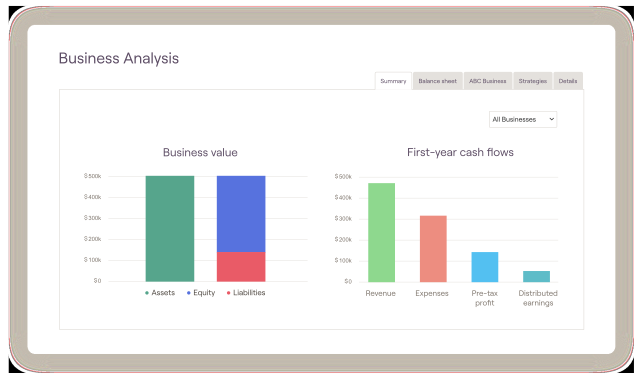
RightCapital’s business planning offering was introduced to help advisors deliver comprehensive planning for business owner clients. The update provides a powerful way to model business cash flows, monitor assets and liabilities, and uncover long-term planning opportunities, making it easier to support complex client needs while expanding your firm’s offering.
Business entries now appear in a dedicated section in RightCapital, and you can assign a business as the owner of key items such as bank and brokerage accounts, credit cards, loans, properties, and insurance policies, along with other assets.
This update includes five core areas with built-in visualizations:
- Summary: Review business value and first-year cash flows, including revenue, expenses, pre-tax profit, and distributions
- Balance sheet: Track business assets, liabilities, and total equity
- Business: Build proposals to compare scenarios across sale, revenue, expenses, and distributions
- Strategies: Evaluate impacts to invested assets and tax liabilities under different scenarios
- Details: View business cash flows and business value over time
Elevate your prospecting approach with RightExpress
Attracting new business is a challenge for advisors. Whether you're just starting out or growing an established practice, meet RightExpress, designed to revolutionize your client prospecting approach.
With RightExpress, build topic-specific financial plans. Gather a few pieces of prospect data in a quick conversation or with a custom link. Sometimes you just need a faster way to get started.
RightExpress is designed for efficiency. Each module requires only two to three steps, so you can instantly generate a clear actionable plan.
RightExpress is flexible. Select only the modules you need, addressing your client's top financial planning concerns.
Prospects see the value of your advice right away with beautiful data visualizations that highlight how you can support their long-term goals.
And with secure document storage and comprehensive reporting, you can prospect with confidence.
Once a client comes onboard, seamlessly convert their express plan into a full financial plan, creating a smooth, modern onboarding experience for you and your clients.
Included with your RightCapital Premium or Platinum subscription, RightExpress can transform your team's lead generation quickly, address your client's most glaring financial planning concerns, and allow you to demonstrate value in the planning process.
Get started today at rightcapital.com.
RightExpress, a powerful new prospecting tool, was designed to simplify outreach and help advisors grow their book of business. With RightExpress, you can demonstrate value early by delivering focused, actionable plans that meet prospects where they are.
Key features include:
- Express modules: Choose from six simplified RightCapital modules, including Social Security, Retirement, Debt, Risk, Tasks, and Vault. Use one or combine several to create an approach that fits each prospects’ needs.
- Enhanced onboarding: Prospects can provide key information in just two or three steps per module, making it easy to build a focused plan quickly. Customize Express templates to streamline setup, then convert an Express plan into a full financial plan with one click when it’s time to onboard.
- Track and manage leads: Use client groups to organize prospects from multiple referral sources, stay engaged throughout the sales process, and tailor your outreach.
- Comprehensive reporting: Generate detailed reports for each Express module to deliver immediate value through a preliminary financial plan.
RightExpress is included with RightCapital’s Premium subscription or higher.
Expedite plan migration from eMoney
More and more advisors are considering switching to RightCapital for their financial planning needs. RightCapital grabs attention for its ease of use, simplicity, ongoing engagement, visuals, reporting outputs, and customer support.
The biggest barrier to upgrading financial planning software is the anticipated time and effort required to migrate client data. But now advisors can save hours of time by transferring data automatically from eMoney and MoneyGuide reports directly into RightCapital.
Simply upload a report from your current planning platform into RightCapital and select the sections you'd like to use in a new or existing client plan.
Our advanced optical character recognition, or OCR, technology scans and reads key data such as family information, financial goals, and income. The data is populated directly within RightCapital for your review.
When transitioning to RightCapital, spend less time on data entry, and more time serving your clients.
Find out more at rightcapital.com.
Advisors transitioning plans from eMoney to RightCapital can do so much faster with limited data entry thanks to Optical Character Recognition (OCR) technology. Simply upload a digital report PDF into RightCapital and select which sections (family information, assets, liabilities, goals, and more) to import into a new or existing client profile. Review and approve data fields during the import process.
(The ability for MoneyGuide users to use OCR technology to transfer plans into RightCapital became available in January 2026.)
Get more creative with Snapshot
A series of updates to the Snapshot personalized plan summary made it even easier to tailor dashboards to your firm’s style and to each client’s priorities. Advisors can now:
- Upload images, such as a company logo or business card, in two different sizes
- Expand any widget into a full-screen, interactive view using the magnifying glass icon
- Start fresh when building a template with the new “Clear all” option
- Apply templates directly within Snapshot to speed up setup
- Add the Cash Flow Maps Waterfall widget to highlight a client’s inflows and outflows for a selected year
- Zoom in and out in report preview for smoother page-by-page review before generating the final report
Save time and streamline processes with new and enhanced integrations
New integrations this year included Jump and Zocks, both using AI to learn key information from client meetings and turn it into suggested financial plan updates, and Pacific Life, allowing you to link traditional and advisory annuity account data within your clients' RightCapital plans.
Existing integrations with Redtail and Wealthbox CRMs were enhanced with updates to Notes and Tasks synching and visibility, importing tag groups and multiple clients simultaneously, and contact information linkage.
Cost basis information now imports automatically when Betterment, SEI, and First Clearing integrations are connected, reducing data entry time and potential manual errors.
Stay current with automatic plan adjustments per The One Big Beautiful Bill Act
The tax parameters within RightCapital have been adjusted to incorporate elements of the 2025 legislation change, which you can read more about in this blog post: OBBB Act Tax Law Changes: What Advisors Need to Know Now. Key changes in accordance with the OBBBA include tax rates; deductions and credits; exemptions and phaseouts; and 529 plan tax-free withdrawal limits.
Expand business insights with RightIntel updates
Five new widgets are available for use on your RightIntel business intelligence dashboard for a quick analysis of your households. “Clients per risk category” shows the average risk score across client plans and the percentage of clients within each risk category. Four additional widgets highlight the top four clients in these areas: “Top clients by vault uploads,” “Top clients by outstanding tasks,” “Top clients by logins,” and “Top clients by highest debt balance.”
With the introduction of RightExpress (mentioned above), an option was added on the Dashboard and Client Overview to view just Full Planning clients, just Express clients, or all plans. A new widget was also created to view the number of RightExpress clients by module they are using.
RightIntel is included with RightCapital’s Premium subscription or higher.
Give clients more detail and settings within the mobile app
Within the RightCapital mobile app, clients can now view every net worth category directly from the Dashboard tab for quicker on-the-go insights. There are also more self-service controls in Settings, allowing clients to update their email address, password, and budget transaction preferences.
Customize estate checklists and review plan scenarios faster
Several Estate module improvements were introduced to make estate planning workflows simpler and more efficient:
- View various plans: Toggle between the current, proposed, or custom scenarios within Estate > Analysis
- Add to the Estate Checklist: Create personalized checklist fields, such as property details or guardianship designations, to match each client’s needs, saving them as templates if needed to reuse across multiple clients
- Propose trusts in one click: The “+ Add New Trust” option is now easier to find
Work with multiple customized return assumption sets
To make it easier to manage investment return assumptions across different client segments and ensure each plan reflects a client’s unique situation, you can now build and maintain multiple return assumption sets in RightCapital.
Start by creating and updating assumption sets in the Advisor Portal. The Asset Return tab has also been redesigned with a clearer layout, making it easier to review and adjust return projections.
When working inside a client plan, apply these sets to customize return assumptions for that household directly from the drop-down menu.
Upload holdings to manual investment accounts
Save time and reduce manual data entry by uploading a CSV file with investment holdings or by copying and pasting data into the new Upload Holdings page. Download the CSV template to simplify formatting. Keep in mind that imported holdings will replace any existing holdings data in the account.
Tell the story with enhanced visuals
A good financial planning visualization is worth 1,000 words. RightCapital’s visualizations are the top-rated in the industry and they got even better this year with updates including:
- New Retirement Details charts: Easily analyze retirement income and help your clients understand the impact of spending strategies with four new charts displaying total spending comparison, income comparison, guardrails spending strategy, and floor/ceiling spending strategy
- Additional data in Cash Flow Waterfall chart: You can now click into an extra layer of the Cash Flow Waterfall chart to see a further breakdown of income, savings, goals, and expenses
- Personalization options in Retirement Analysis & Stock Plans: If desired, use the same scale for both charts on the probability tab and show either years or client age on the X-axis
- Options for reordering Stress Test & Retirement Analysis: Rearrange Stress Test items and/or custom plans in the Retirement Analysis
- Blueprint account linking and client access: Link accounts directly within the Blueprint and personalize which sections of Blueprint each client can access
Personalize reports further
Create free form pages with rich text editing features for client reports. Drag and drop pages such as an executive summary or table of contents as part of the report. You can also now choose the number of years of cash flow data to include in a PDF report by toggling the “Select Years” item.
As we head into 2026, we’re committed to continuing this momentum. Thank you for all the feedback that shaped this year’s updates, and for trusting RightCapital as a core part of your financial planning process. Stay tuned for what’s next.
For more detail on these enhancements and more, check out our Q1, Q2, and Q3 blog posts.
:format(jpeg))
:format(jpeg))
:format(jpeg))
:format(jpeg))
:format(jpeg))
:format(jpeg))