Why Financial Advisors Should Use Planning Software (+ How to Choose)
February 2, 2026
%3Aformat(webp)&w=3840&q=75)
Key Takeaways
- According to 2025 Kitces research, clients expect interactive visuals, real-time scenario modeling, and comprehensive plans that cover retirement, tax, insurance, estate, and more in a single platform.
- The core value of financial planning software is shifting advisor time from number-crunching and data entry to client conversations.
- RightCapital connects with major CRMs, custodians, and portfolio management platforms so client data flows seamlessly into plans; and tools such as Snapshot and Blueprint turn that data into clear, client-ready visuals.
Financial planning software helps advisors deliver clearer recommendations, model “what-if” scenarios faster, and improve clients' understanding of the full plan. According to the March 2025 Kitces Research report, 90% of financial advisors are currently using financial planning software. If you’re still relying on spreadsheets or manual calculators, adopting the right platform can significantly improve both your efficiency and client experience.
Whether you’re an RIA, part of an independent broker-dealer, or running a financial planning practice, modern planning tools can also help you standardize processes across your team and scale advice without sacrificing quality.
What is financial planning software?
At a basic level, financial planning software is a platform that runs financial calculations and long-term projections across a client’s full financial life including assets, liabilities, income, goals, taxes, and retirement timing.
In practice, the best tools can pull together client data from places such as:
- Bank accounts and credit cards
- Student loans and mortgages
- Investment and retirement accounts
- Social Security and pension inputs
- Insurance, education funding, and recurring expenses
Instead of managing multiple spreadsheets, advisors can centralize data, run scenarios, and create a consistent plan deliverable.
Why it matters for advisors: Less manual work, fewer errors, and faster planning turnaround, especially when building plans at scale across many households.
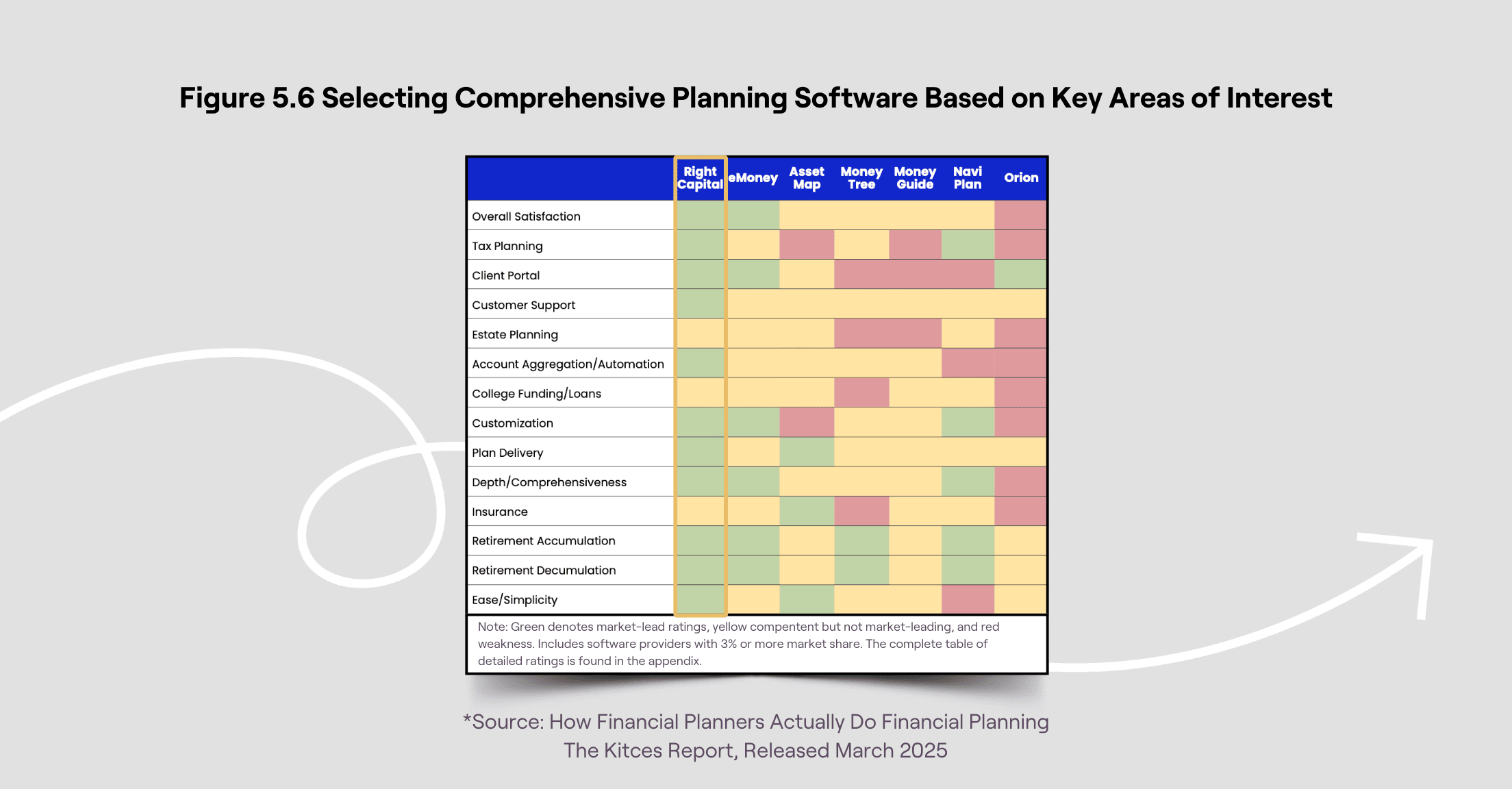
Who are the main players in financial planning software?
If you’re evaluating planning software, most advisors compare the “big three”:
- RightCapital
- eMoney Advisor
- MoneyGuidePro
Choosing the right platform depends heavily on the planning approach you use and the needs of your client base. For example:
- Do you prefer goal-based planning, cash-flow planning, or a hybrid?
- Do you frequently plan for student loans, equity comp, or variable income?
- Do your clients require planning around taxes, charitable giving, or estate considerations?
- Are you working with clients in multiple states where state tax assumptions and relocation scenarios matter?
A useful rule of thumb: Choose software that fits your planning style and supports how you actually deliver advice to clients (meeting workflow, scenario presentations, reporting, and ongoing updates).
What does financial planning software offer over spreadsheets or pen-and-paper?
Spreadsheets can be powerful, but they’re hard to standardize, time-consuming to maintain, and easy to break, especially when assumptions change. Financial planning software is designed for repeatable workflows and client-facing outputs.
1) Integrations that reduce double-entry
Most modern platforms integrate with tools advisors already use, including:
- CRM systems
- Custodians and clearing firms
- Performance reporting systems
- Account aggregation and analytics platforms
This means you can spend less time gathering data and more time interpreting it.
2) Clear, client-friendly reporting
Instead of sending clients a collection of tabs and calculations, planning software helps you convert the plan into a clean deliverable, often with customizable reports and visual summaries that improve client understanding and follow-through.
3) Advanced retirement projections (including Monte Carlo)
Many financial planning tools include Monte Carlo analysis to model uncertainty and demonstrate how a plan holds up across many market environments.
For example, a Monte Carlo simulation might generate 1,000 market return scenarios and estimate a probability of success, helping clients understand tradeoffs such as spending changes, retirement timing, or portfolio risk.
4) Business intelligence for your firm
Many platforms offer business intelligence dashboards so you can review your book of business, identify planning gaps, and standardize best practices across advisor teams and offices.
5) Secure document storage and collaboration
A built-in vault or document upload feature can make it easier to collect statements, tax returns, and planning documents securely, all while reducing back-and-forth emails.
6) Support that keeps you moving
A planning platform is only as good as your ability to use it confidently. Strong support (chat, phone, help center, and case reviews) helps advisors reduce downtime, solve modeling questions faster, and onboard new team members more efficiently.
7) Better client experience (portal + mobile)
Client portals and mobile apps allow clients to:
- Review plan updates
- Complete tasks
- Enter or confirm data
- Upload documents securely
This improves engagement and helps you run a more collaborative planning process.
Would you like to try RightCapital?
If you'd like to explore how financial planning software can streamline your planning, start with a RightCapital demo. Learn how scenario modeling, reporting, and planning workflows work in practice, and how your process could look once spreadsheets become the exception instead of the default.
Schedule a 1:1 demo to experience RightCapital for yourself.
%3Aformat(webp)&w=3840&q=75)
%3Aformat(webp)&w=3840&q=75)
%3Aformat(webp)&w=3840&q=75)
%3Aformat(webp)&w=3840&q=75)
%3Aformat(webp)&w=3840&q=75)