Developments & Highlights from RightCapital in Q1 2023
March 31, 2023


Key Takeaways
- Major updates to the client-facing mobile app make it easier for clients to stay engaged with their plan on the go.
- A redesigned Budget module gives advisors and clients a clearer, more intuitive way to track spending.
- RightCapital was updated to reflect SECURE Act 2.0 changes.
Looking for the most recent updates? Here are RightCapital’s Most Exciting Enhancements in 2025.
So far this year, RightCapital updates have arrived as quickly as ChatGPT think pieces on LinkedIn. If you aren’t yet a subscriber to our financial planning software or if your email is far from inbox zero (we get it), catch up with what we’ve been doing over the last three months:
Celebrating your kind words
We can’t thank our advisors enough for how they recommend RightCapital on Twitter and LinkedIn, respond with excitement to product update emails, or relay their thoughts in industry surveys and reports. We are proud to be rated #1 in advisor satisfaction of the major financial planning software platforms in both the Kitces Report: “How Financial Advisors Actually Do Financial Planning” and the T3/Inside Information Advisor Software Survey. Notably within the Kitces Report when compared to eMoney and MoneyGuidePro, RightCapital is rated highest in the following categories and more: Student Loan Planning and Analysis, Client Portal, Simplicity, Client-Directed Data Gathering, Tax Planning, and Ease of Use.
Enhancing our client-facing mobile app with major updates
We are thrilled to announce the new RightCapital mobile app where clients can view their entire financial lives on the go.
Let's start with our redesigned dashboard with net worth, probability of success, and accounts that your clients can tap into for more details. Important action items such as unlinked accounts and overdue tasks are front-and-center so your clients can take action.
On the Budget tab, clients can stay on top of their spending and see how they are tracking against their budget goals for the month. Clients can link credit cards and bank accounts, edit transaction names and categories, and view their expenses for different periods of time. They can also search for transactions and set budgets for new categories, all within the app.
Using the Tasks tab, clients can create and assign tasks to themselves, their partner, and their advisor. Clients can also confirm completion of tasks or delete tasks they've created.
Our popular Vault storage feature is now available on mobile. Clients can easily snap photos of documents or upload files to securely share them with advisors. They can also store files for their own use.
Lastly, on the Investment tab, clients can see the overall asset allocation of their holdings or tap into individual accounts.
Schedule your personalized demo today to learn how RightCapital's mobile app can enhance the value of your financial planning services.
This quarter, the RightCapital mobile app had a significant glow-up and remains the only true companion mobile app from a financial planning software. We redesigned the Dashboard, Budget, Tasks, and Asset Allocation modules and also added our Vault secure document storage, including the ability to preview saved documents by simply tapping the file name.
Redesigning the Budget module
Let's now talk about the fun stuff. So this is our brand new revamped budgeting tool in RightCapital, and what we see here is a really great consolidation of information that focuses on the client's income, the client's spending, and ultimately that detail is flowing from any linked accounts in the profile net worth.
I want to focus on a few quick things here, because we have some differences in the way the layout is seen from the way it was previously. So first, what we're going to see is this Summary tab, which gives us an update for this current month, where we're at in terms of spending. This is where, for example, I can see from March 1st to March 10th where the client is in terms of their spending on different categories. And these categories and thresholds for the spending are assigned through the budget tool. So we'll get there in a minute, but we can see that maybe for bills and utilities, there's a thousand dollar monthly budget there and they've spent at this point $320. So there's $680 left.
So if we're, let's say, under 50% here, what we're going to see is the green bar, which says we've got plenty of room left in the budget. If we are approaching the higher top of the budget here, we'd switch to a yellow bar or an orange bar. And we can also see if someone is over budget here, like for example, maybe we had a little more auto and transport cost than we assumed this year. So we're actually at $700, over the $500 budget. We're going to show red, so it's going to indicate we're over budget for that month and that category.
And all this information is just auto-categorized for us. The action items here that used to store the information around creating the budget are now just an area for notes, so you can add in your notes that will print on the report. For example, looks like we're over budget for auto and transport. They were gearing up for a big road trip and we want to make sure the car is in good shape. But these are notes that are available just if we want to call attention to anything for the report itself.
And beyond that, we can also see that this screen is just the starting place where we can begin to talk through what previous activity we've seen. So this is where we can really look at different timelines. Here we can say what happened this month, or last month, maybe the last three months, last six months, year to date, a custom time period as well from a certain calendar year then to now. So we can analyze everything from expenses over time, to income over time, net income, so we can say what's really happening here.
Our Budget module was revamped within the mobile app but also within our full platform and client portal. If your subscription includes account aggregation, clients can link bank and credit card accounts to see and categorize individual transactions. Clients can easily manage their expenses vs. a monthly budget they have set, in summary, by viewing activity over specified time periods, and in detail by transaction.
Modifying for SECURE Act 2.0
Within days of the SECURE 2.0 Act being signed into law, RightCapital was ready with updates for the raising of Required Minimum Distribution (RMD) ages, adjustments for inflation for Qualified Charitable Distributions (QCD), catch-up contributions for employer-sponsored retirement plans, and more.
Modeling “Married Filing Separately” tax status
By popular demand, the ability to account for the tax filing status of “Married Filing Separately” has arrived. This allows for more flexibility in viewing individual tax details (such as sample tax forms and tax estimate charts), proposing separate Roth conversion strategies, and capturing personal tax assumptions.
Creating new options for return model assumptions
We’ve added more control to align your beliefs as an advisor with the planning software by providing options for return modeling (standard and legacy) and more flexibility to use geometric or arithmetic calculation types. Return and volatility values are updated annually for the predefined return assumption sets.
Updating our Snapshot module
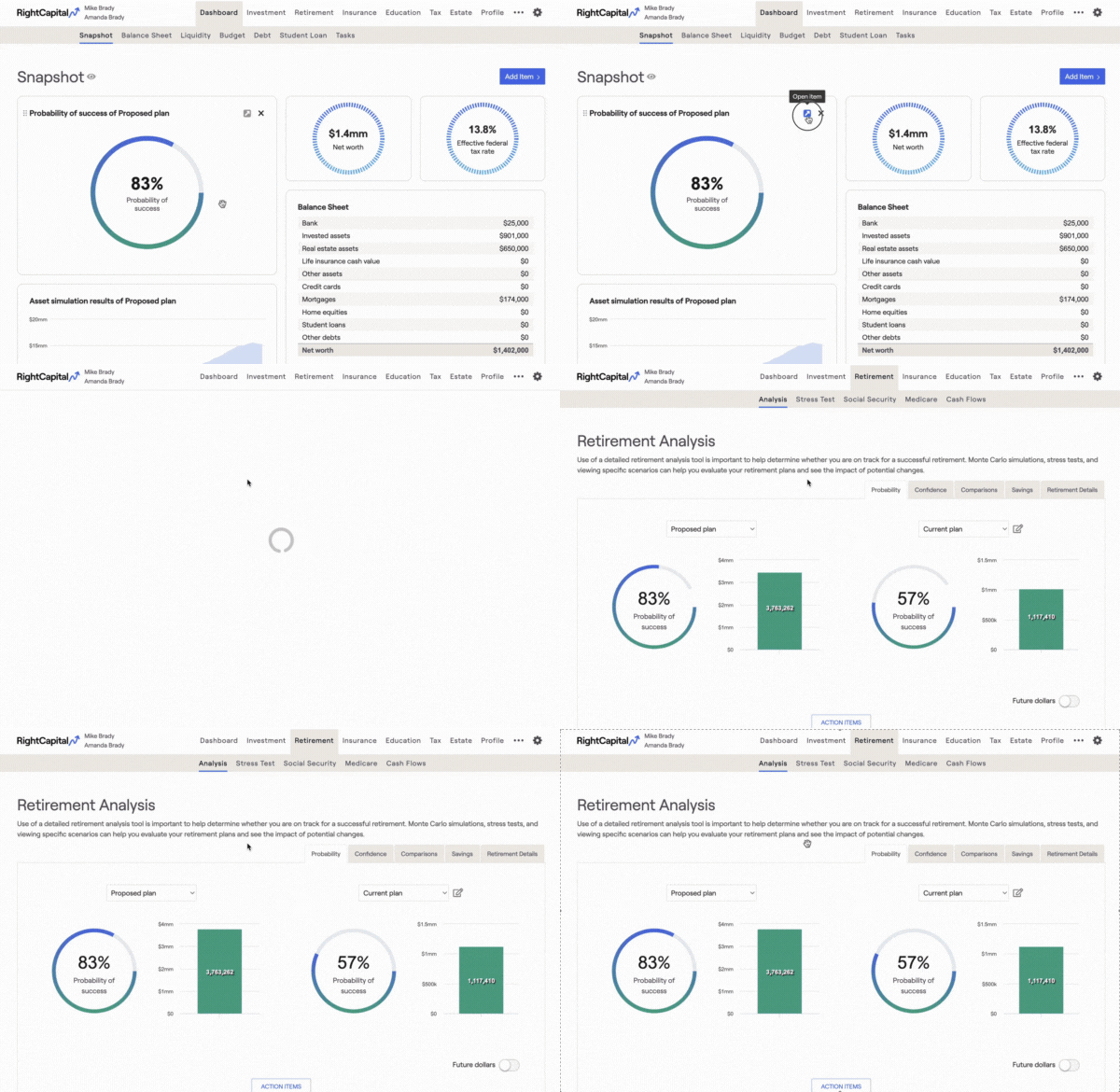
Advisors can now hover over charts within Snapshot to take them right into the corresponding module for quick edits. There’s also more flexibility in the text boxes as you can double the size of the normal text box if you need to provide more detail or recommendations to clients.
Revamping the Notes feature
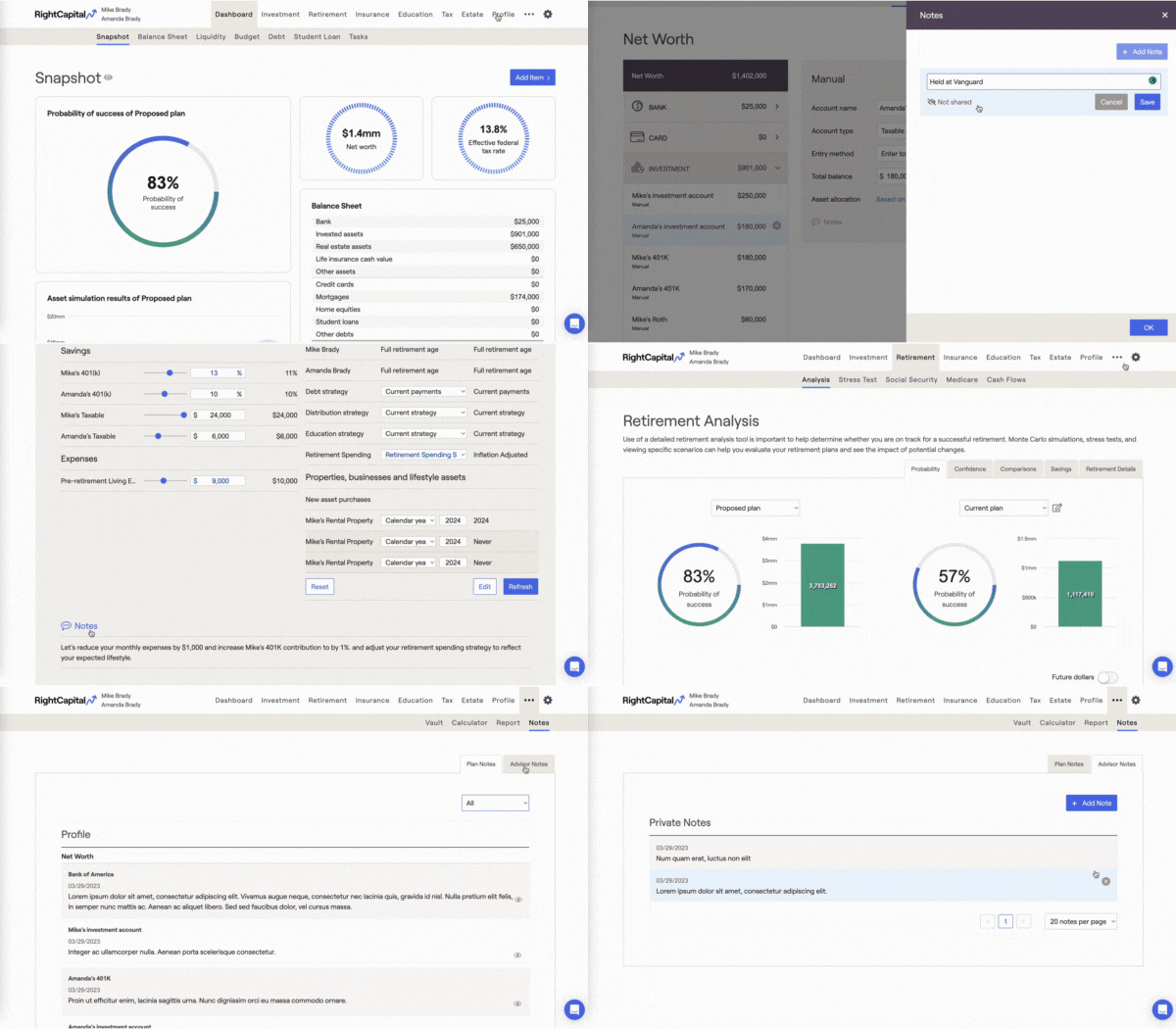
Track client conversations easily with our updated Notes feature on profile cards, accounts, and action items sections. Set individual notes’ privacy depending on if you would like to share with the client or not. Organize better by viewing all in one place on the new Notes tab, time-stamping the notes with dates you created the notes, and the ability to print “shared” notes within the PDF report.
To learn more about these updates and more, schedule a personalized demo today!
:format(jpeg))
:format(jpeg))
:format(jpeg))
:format(jpeg))
:format(jpeg))
:format(jpeg))